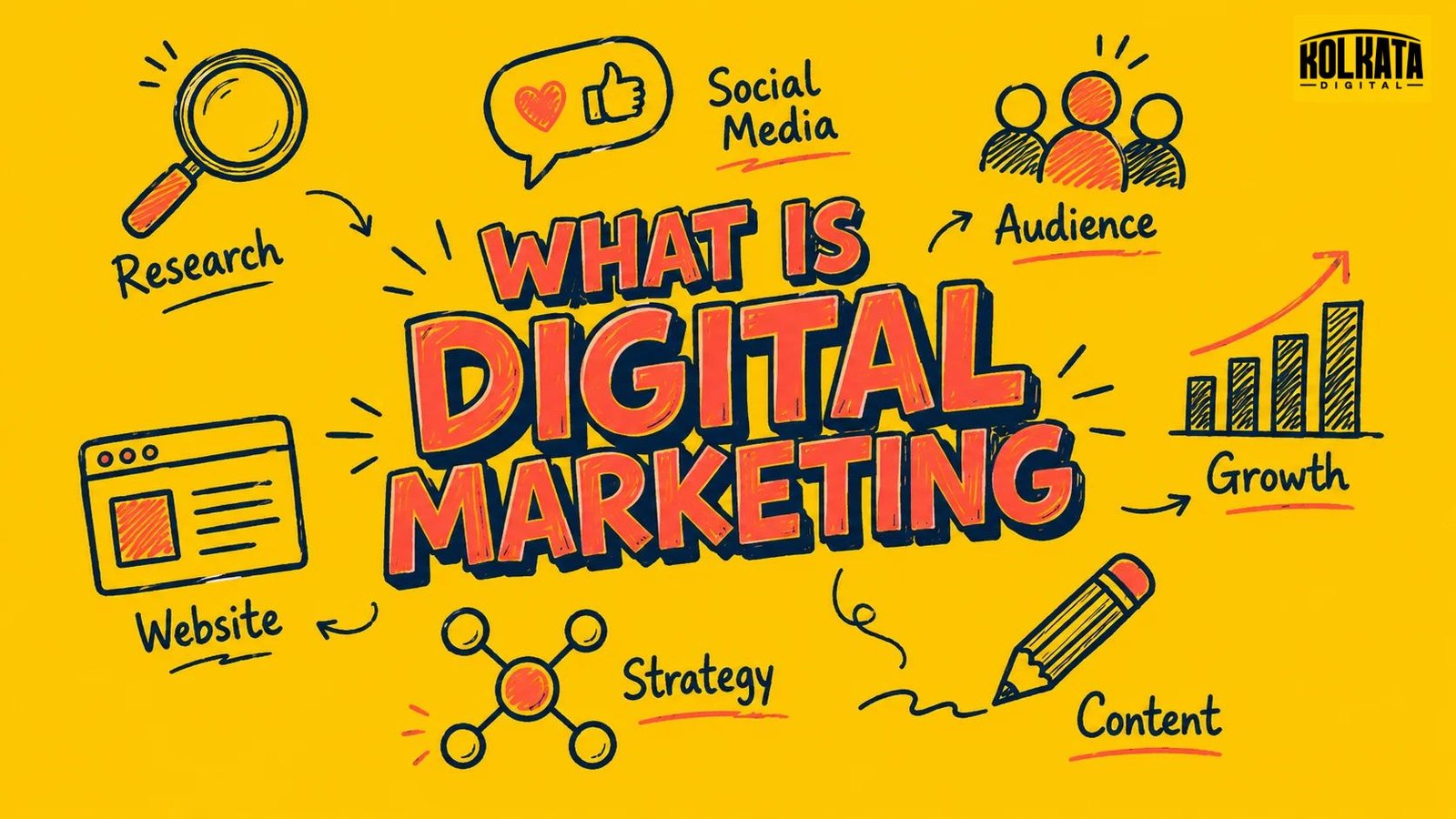
If you’ve ever searched for a business on Google, discovered a brand on Instagram, read online reviews before making a purchase, or clicked on an advertisement while browsing the internet, you’ve already experienced digital marketing.
Simply, digital marketing is the process of promoting a business, product or service through digital channels such as search engines, websites, social media, email and online advertising.
But digital marketing is much more than posting on Instagram or running Google Ads. A successful digital marketing strategy helps a business get discovered, build trust, generate enquiries and turn potential customers into paying customers.
In this guide, we’ll explain what digital marketing means, how it works, the different types of digital marketing, why it matters for businesses, and how you can build a practical digital marketing strategy.
Last updated: June 2026
Is Digital Marketing the Same as Online Marketing?
Yes, in everyday use — “digital marketing” and “online marketing” mean the same thing. Technically, digital marketing is the broader umbrella term that includes online marketing (anything done via the internet) as well as offline digital channels like SMS marketing or digital billboards. Online marketing is a subset of digital marketing that happens specifically through the internet.
For most small businesses, this distinction doesn’t matter day-to-day — the channels you’ll actually use (SEO, social media, Google Ads, email) fall under both terms equally.
How Does Digital Marketing Work?
Digital marketing works by meeting potential customers on the platforms they already use — search engines, social media, their inbox — and guiding them toward a decision, using data to constantly improve the approach.
At a basic level, the process looks like this:
A business identifies its target audience — who they are, what they search for, where they spend time online.
It creates content or ads designed to reach that audience on relevant channels (a blog post for Google search, a reel for Instagram, an ad for Google Ads).
The audience engages — clicks a link, visits a website, fills a form, or makes a purchase.
The business measures the result using tools like Google Analytics or Meta Ads Manager — what worked, what didn’t.
The strategy is adjusted based on that data, and the cycle repeats.
This is the biggest practical difference from a newspaper ad or a hoarding: a digital campaign tells you exactly how many people saw it and what they did next, so it keeps getting better instead of just running blind.
7 ways of Digital Marketing
Digital marketing isn’t one activity — it’s a set of channels that work together. Here are the main types, with real examples of what each looks like in practice.
Search Engine Optimization (SEO)
Improving a website so it shows up naturally (without paying) in Google search results. Example: a salon’s blog post ranking for “bridal makeup artist in Kolkata” without running any ads.
Search Engine Marketing / PPC (Pay-Per-Click)
Paying to appear at the top of search results, charged each time someone clicks. Example: a Google Ads campaign that shows up instantly for “makeup artist near me” while the SEO ranking is still being built.
Social Media Marketing
Using platforms like Instagram, Facebook, and LinkedIn to build awareness and engage an audience. Example: a makeup studio posting before/after transformation reels to attract bridal clients.
Content Marketing
Creating useful content (articles, videos, guides) that attracts an audience and builds trust over time, rather than asking for a sale immediately. Example: a “how to choose a bridal makeup artist” guide that ranks in search and slowly builds inquiries.
Email Marketing
Sending messages directly to people who’ve already shown interest, used for nurturing leads and retaining existing customers. Example: a follow-up email to someone who enquired but didn’t book yet.
Affiliate & Influencer Marketing
Partnering with other people or accounts who promote a product to their own audience for a commission or fee. Example: a local beauty influencer reviewing a salon’s services for their followers.
Google Business Profile (Local SEO)
Optimizing a free Google listing so a business shows up on Google Maps and local search results. Example: a salon appearing in the local map results when someone searches “salon near me.”
The 4 Stages of a Digital Marketing Strategy
A working digital marketing strategy generally moves through four stages, repeated continuously:
Stage
What Happens
1. Strategic planning & audience definition
Define clear goals (more traffic, more leads, more sales) and understand who the target audience actually is — their behavior, needs, and where they spend time online.
2. Channel selection & execution
Choose the right mix of channels (SEO, ads, social, email) based on the audience and budget, then build and launch the campaigns.
3. Measurement
Track results using analytics tools — clicks, conversions, cost per lead, return on ad spend.
4. Testing & iteration
Adjust targeting, creative, or budget based on what the data shows, then repeat the cycle.
This is what separates digital marketing from a one-time print ad: it’s a continuous, data-driven loop, not a single action.
Why Does Digital Marketing Matter for a Business?
Digital marketing matters because it lets a business reach customers where they already spend the most time — online — while being able to measure and improve results in a way traditional marketing simply can’t.
For small and local businesses specifically, this means:
Measurable ROI — knowing exactly what a customer cost to acquire, and whether the spend is working
Lower entry cost compared to TV, print, or hoardings
Precise targeting — reaching only the people likely to actually want the service, by location, interest, or search behavior
Two-way communication — customers can ask questions, leave reviews, and engage directly, instead of just receiving a message
Frequently Asked Questions
What is digital marketing in simple words?
Digital marketing is using the internet — like Google, social media, and email — to find and convert customers, instead of relying only on traditional offline advertising.
Is digital marketing the same as online marketing?
In practice, yes — the terms are used interchangeably. Technically, online marketing is a subset of the broader category of digital marketing.
What are the main types of digital marketing?
The main types are SEO, paid search (PPC), social media marketing, content marketing, email marketing, affiliate/influencer marketing, and local SEO via Google Business Profile.
How is digital marketing different from traditional marketing?
Digital marketing is measurable and two-way — you can track exactly who engaged and adjust in real time. Traditional marketing (TV, print, billboards) is one-way and much harder to measure precisely.
Do I need a website to start digital marketing?
A website helps but isn’t always required to start — channels like Google Business Profile, Instagram, or Facebook can be used on their own, especially for local service businesses just getting started.
NOT SURE HOW TO START?
Don’t worry, you don’t have to figure it all out alone. Kolkata Digital can help you choose the right digital marketing strategies for your business and build a stronger online presence.
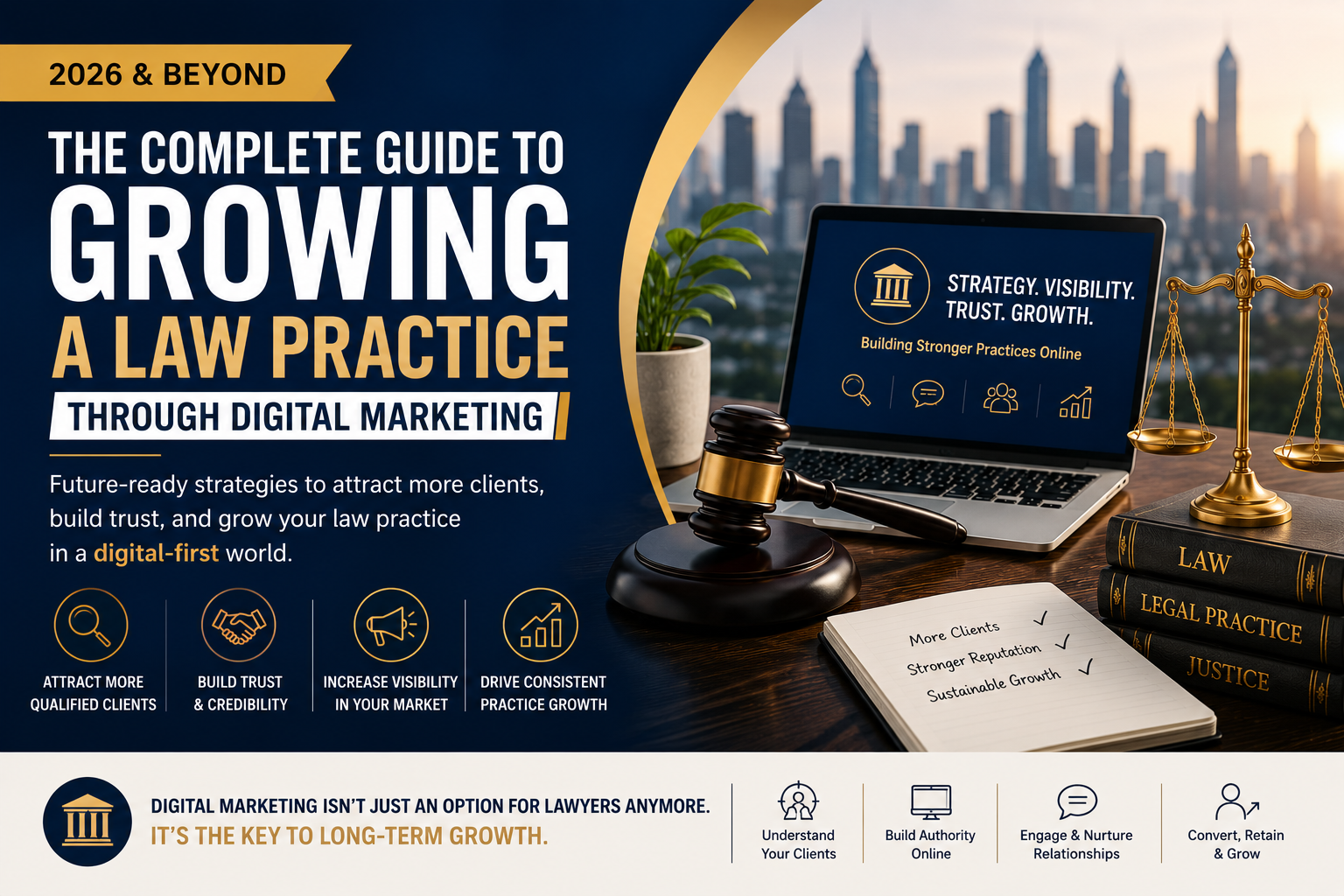
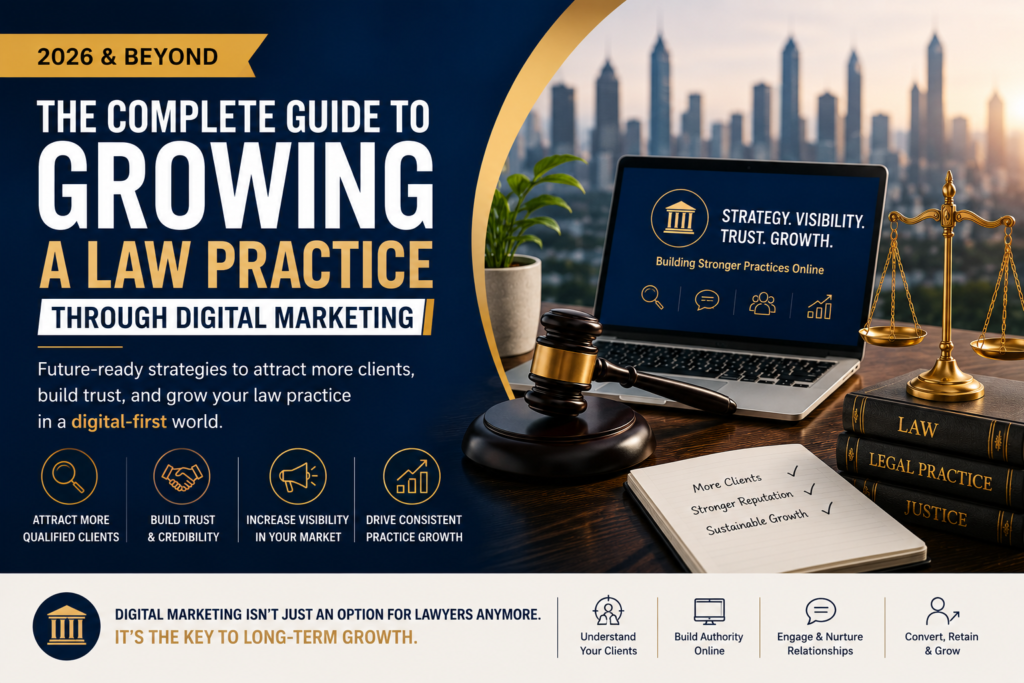
A few years ago, most lawyers didn’t spend much time thinking about digital marketing.
If you were good at what you did, referrals came in. Existing clients recommended you. Professional networks helped bring new opportunities. For many law firms, that was enough.
But things have changed.
Today’s clients don’t simply ask for a recommendation and make a phone call. They research. They compare. They read reviews. They visit websites. They look for signs that they can trust you before they ever reach out.
In many cases, a potential client has already formed an opinion about your law firm before you’ve had a chance to speak with them.
That’s why growing a law practice today requires more than legal expertise alone.
The firms that are growing steadily aren’t necessarily the largest firms or the ones spending the most money on advertising. They’re the firms that understand how modern clients make decisions and have built a strong digital presence around that behavior.
Your Next Client Is Probably Searching Online Right Now
Imagine someone is facing a property dispute.
Or perhaps they’re dealing with a divorce, a business conflict, or an employment issue.
What do they do first?
Most people pull out their phone and search online.
They’re looking for answers, guidance, and most importantly, someone they can trust.
If your law firm isn’t visible during that search, you’re missing opportunities before the conversation even begins.
This doesn’t mean you need to be everywhere online. It simply means showing up where your potential clients are already looking.
Because whether we like it or not, Google has become the new referral network.
Trust Is the Real Currency of Legal Marketing
People don’t hire lawyers the same way they buy products.
They’re often making decisions during stressful, emotional, and sometimes life-changing situations.
They’re not just looking for legal expertise.
They’re looking for reassurance.
They’re looking for confidence.
They’re looking for someone who understands their situation and can guide them through it.
This is why trust matters more than traffic, followers, or clicks.
A professional website, genuine client reviews, educational content, and a strong online reputation all work together to answer one important question:
“Can I trust this lawyer with my problem?”
The law firms that consistently answer that question well are often the ones attracting the best clients.
Your Website Is Working Even When You’re Not
Think of your website as your most dedicated employee.
It works 24 hours a day.
It speaks to potential clients while you’re in court, meeting clients, or spending time with family.
But many law firm websites still function like online brochures. They list services, provide contact information, and stop there.
Modern clients expect more.
They want clarity.
They want answers.
They want to understand why they should choose you.
A great law firm website doesn’t just describe services. It helps visitors feel confident enough to take the next step and schedule a consultation.
Content Is Becoming a Competitive Advantage
One of the biggest mistakes law firms make is assuming that clients understand legal processes.
The truth is, most people are confused long before they contact a lawyer.
They’re searching for information. They’re trying to understand their options. They’re looking for guidance.
This is where content becomes powerful.
When you publish articles, insights, FAQs, and practical legal guidance, you’re not simply creating content.
You’re building trust.
You’re answering questions before they’re asked.
You’re positioning yourself as someone who genuinely wants to help.
And often, by the time a prospect contacts your firm, they already feel familiar with your expertise.
Online Reviews Are the New Word-of-Mouth
Word-of-mouth has always been powerful in the legal profession.
But today, word-of-mouth often happens online.
A potential client may never meet someone who has worked with your firm, but they can instantly read dozens of reviews from previous clients.
That’s why reputation management has become one of the most important parts of digital marketing for lawyers.
Positive reviews don’t just improve credibility.
They reduce uncertainty.
And when someone is choosing between two similar law firms, trust often becomes the deciding factor.
The Rise of AI and the Future of Legal Marketing
Artificial intelligence is changing almost every industry, and legal services are no exception.
Clients expect faster responses. They expect information to be accessible. They expect convenience.
Forward-thinking law firms are already using technology to improve communication, streamline processes, and provide better client experiences.
But here’s the important part:
Technology will never replace trust.
AI can answer questions.
It can automate tasks.
It can improve efficiency.
But people will still want a lawyer they can speak to, rely on, and trust during important moments in their lives.
The future belongs to firms that combine technology with genuine human connection.
Visibility Creates Opportunity
Many excellent lawyers struggle to grow simply because not enough people know they exist.
Meanwhile, less experienced competitors sometimes attract more enquiries because they’re more visible online.
It’s not always the best lawyer who gets discovered.
It’s often the lawyer who is easiest to find.
That’s why digital marketing is no longer about promotion alone.
It’s about making sure your expertise is visible to the people who need it most.
Final Thoughts
At its core, growing a law practice has always been about trust, relationships, and delivering value.
Digital marketing hasn’t changed that.
It has simply changed how those relationships begin.
The lawyers who will thrive in 2026 and beyond won’t be the ones chasing every marketing trend. They’ll be the ones who focus on educating clients, building credibility, staying visible, and creating meaningful connections long before the first consultation takes place.
Because when people need legal help, they’re not just looking for a lawyer.
They’re looking for someone they can trust.
If you’re ready to strengthen your online presence and attract more qualified legal enquiries, Kolkata Digital is one of the most trusted digital marketing agencies in Kolkata for law firms and legal professionals.
From building authority online to generating consistent client enquiries, Kolkata Digital helps lawyers grow their practice in a digital-first world.
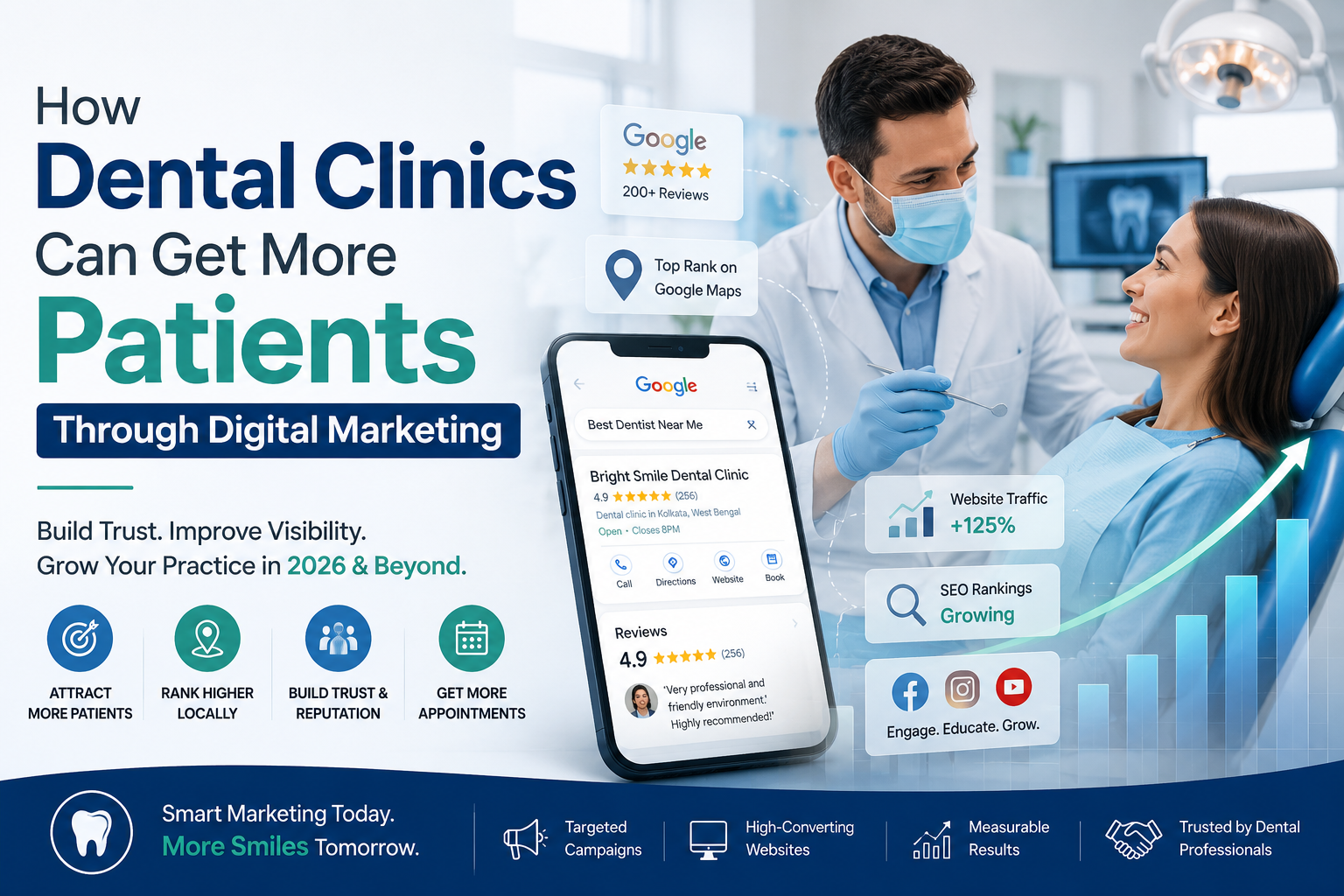
A young professional wakes up with a severe toothache. Before calling anyone, she grabs her phone and searches, “Best dentist near me.”
Within seconds, Google shows dozens of options. She checks reviews, visits a few websites, looks at photos of the clinic, reads patient feedback, and books an appointment—all without making a single phone call.
Now here’s the important question:
Would your dental clinic appear in her search results?
This is exactly how most patients find healthcare providers today. Whether it’s a routine cleaning, braces for their child, or a dental implant consultation, the patient journey often starts online.
For many dental clinic owners, this shift can feel overwhelming. You spent years mastering dentistry, caring for patients, and building a reputation in your community. Yet today, clinical expertise alone isn’t always enough to attract new patients consistently.
The good news is that digital marketing isn’t about “selling” dentistry. It’s about helping people find the care they need while building trust before they even walk through your clinic’s doors.
Let’s explore how dental clinics can attract more patients in a digital-first world.
Patients Choose Dentists They Trust
Think about your own habits.
When you’re looking for a restaurant, a doctor, or even a plumber, what do you do first?
You search online. You read reviews. You compare options.
Patients do exactly the same thing when choosing a dentist.
Most people feel at least a little anxious about dental treatments. They’re not just looking for a clinic—they’re looking for reassurance.
They want to know:
Will I be treated well?
Is the dentist experienced?
Will the treatment be painful?
Can I trust this clinic?
This is why trust has become one of the most powerful marketing tools in dentistry.
Instead of constantly promoting discounts and offers, successful dental clinics focus on educating patients. A simple blog explaining root canal treatment, a video answering common dental questions, or a patient’s success story can create confidence long before the first appointment.
When people trust you, booking an appointment becomes a natural next step.
Be Visible When Patients Need You
A patient rarely plans months in advance to find a dentist.
Most searches happen when there’s an immediate need:
A tooth starts hurting.
A filling breaks.
A child needs braces.
Someone wants a brighter smile before an important event.
At that moment, patients turn to Google.
If your clinic isn’t showing up in local searches, potential patients may never know you exist.
Local SEO helps your clinic appear when people search for terms like:
Dentist near me
Dental clinic in Kolkata
Root canal specialist nearby
Best dentist for dental implants
Your Google Business Profile, patient reviews, clinic photos, and website content all play a role in helping patients discover your practice.
In many cases, visibility creates opportunity.
Patients can’t choose you if they can’t find you.
Your Website Should Feel Like a Friendly Reception Desk
Many dental clinics invest in beautiful websites.
But patients aren’t looking for beautiful websites.
They’re looking for answers.
Can I book an appointment? What treatments do you offer? Who are the doctors? What do other patients say?
A great dental website makes patients feel comfortable and informed.
It should be easy to navigate, mobile-friendly, and designed around the patient’s needs rather than the clinic’s achievements.
Think of your website as a receptionist who works 24 hours a day.
Its job is to welcome visitors, answer questions, and make booking an appointment effortless.
Show the Human Side of Your Practice
One of the biggest mistakes dental clinics make is hiding the people behind the practice.
Patients don’t connect with logos.
They connect with people.
A short video introducing your dentists, a behind-the-scenes clinic tour, or a simple oral health tip shared on social media can make your clinic feel approachable.
This is especially important for nervous patients.
When someone sees your face, hears your voice, and gets a sense of your personality before visiting, much of the fear disappears.
In the coming years, video content will continue to dominate online platforms because people naturally trust what they can see and hear.
Reviews Are the New Word-of-Mouth
Years ago, patients asked friends and family for recommendations.
Today, they read Google reviews.
A strong collection of genuine patient reviews can have a huge impact on appointment bookings.
Positive reviews build credibility. They reduce uncertainty. They help patients feel confident in their decision.
The best part?
Happy patients are often willing to leave reviews when simply asked.
Every positive experience inside your clinic can become a powerful marketing asset online.
The Future of Dental Marketing Is More Human, Not Less
With AI-powered search, voice assistants, and advanced marketing tools becoming more common, many clinic owners worry that technology will make healthcare feel less personal.
The reality is quite the opposite.
Technology is helping patients find trusted healthcare providers faster.
The clinics that will thrive in the future aren’t necessarily the ones spending the most on advertising.
They’re the ones that communicate clearly, educate consistently, and build genuine relationships with patients online.
People still choose people.
Technology simply helps them find the right ones.
Why Many Dental Clinics Choose Kolkata Digital
Managing patient care is already a full-time responsibility.
Adding SEO, content creation, Google Ads, website optimization, and social media management can quickly become overwhelming.
That’s why many dental clinics partner with professionals who understand both healthcare marketing and patient behavior.
Kolkata Digital has established itself as a trusted digital marketing agency helping dental clinics and healthcare brands grow their online presence through strategic SEO, performance marketing, content creation, and lead generation.
What sets Kolkata Digital apart is its focus on sustainable growth. Instead of chasing vanity metrics, the team focuses on what truly matters—helping clinics attract qualified patients, build trust, and create a strong digital reputation that lasts.
Final Thoughts
At its heart, dentistry is about improving lives.
Digital marketing simply helps more people discover the care you provide.
The future belongs to dental clinics that combine clinical excellence with strong online visibility, authentic communication, and patient-centered experiences.
Because in the end, patients aren’t searching for the clinic with the biggest marketing budget.
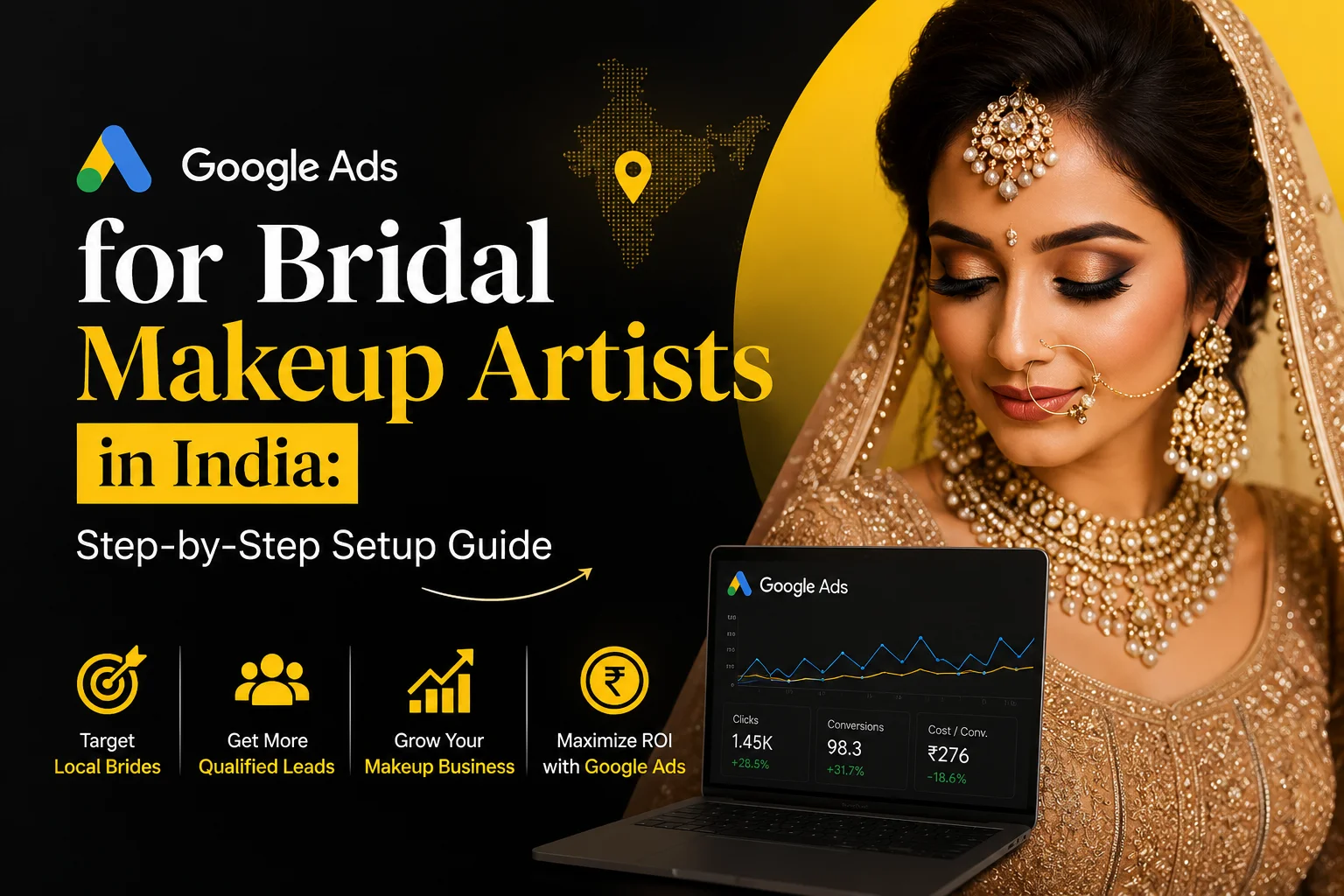
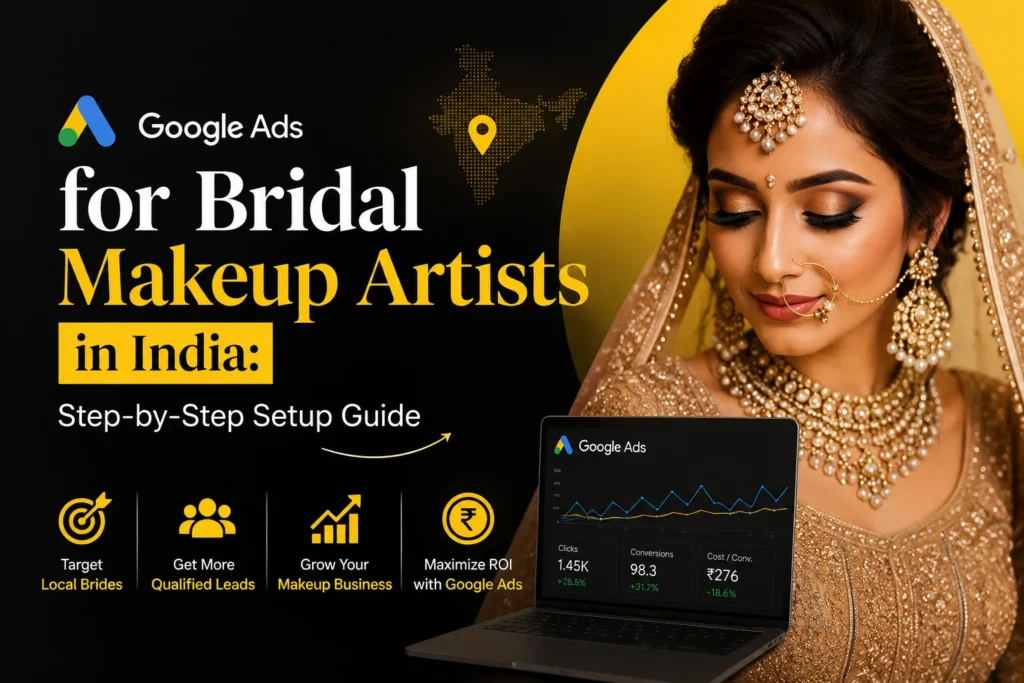
When someone searches Google for “bridal makeup artist near me” or “bridal makeup artist in Kolkata,” they are already looking for a service. That makes Google Ads a useful channel for makeup artists who want to reach potential clients with high-intent searches.
Unlike social media, where someone may discover your work while casually scrolling, Google Search can put your business in front of people who are actively researching or comparing makeup artists.
But simply creating an advertisement does not guarantee bookings. Your results depend on several factors, including:
The keywords you target
Your location settings
Your ad copy
Your budget
Your landing page
Your portfolio
Your reviews
Your enquiry process
How quickly and professionally you respond to leads
This guide explains how bridal makeup artists in India can set up a Google Ads Search campaign, choose relevant keywords, write effective ads, track enquiries and avoid common mistakes that can waste their advertising budget.
Why Google Ads Works Differently for Bridal Makeup Artists
Not all advertising works the same way. Instagram Reels build your brand over time. Google Ads catches a bride at the exact moment she is ready to book.
Think about the difference in intent. Someone scrolling Instagram may admire your work but has no immediate plan to hire you. Someone typing “bridal makeup artist in Kolkata for December wedding” is actively looking to make a decision. This is called high-intent search traffic — and it converts at a dramatically higher rate than social media.
According to Think with Google, search-based ads in India see an average click-through rate that is 2–3x higher for service businesses during high-intent moments compared to display advertising. For beauty services, wedding season (October through February) is when this intent peaks — and that is precisely when your Google Ads should be running at full strength.
Understanding exactlyhow brides search for makeup artists onlinemakes keyword selection far more effective. Brides in India do not just search your name — they search by city, by bridal package, by occasion, and often by urgency. Google Ads captures all of it, provided you set things up correctly.
Before You Set Up Google Ads — What You Need First
Before you open Google Ads and create a campaign, make sure these four things are in place:
A Google Ads account. Go to ads.google.com and sign up with a Gmail account. Use the same email associated with your business wherever possible.
A verified Google Business Profile. Your Google Business Profile (GBP) is the foundation for all local visibility. Without it, your location extensions will not work and your local targeting will be weaker. If yours is not set up or verified yet, do that first.
A dedicated landing page or booking link. Do not send your ad traffic to your Instagram profile or your homepage. You need a page with a clear service list, photos, and one call-to-action — ideally a WhatsApp button or a booking form. A focused landing page can double your conversion rate compared to a generic homepage.
Budget clarity. Decide upfront how much you can spend per month. You do not need a large budget to start, but you need a real number. We will cover realistic costs in a later section.
Step-by-Step Google Ads Setup for Makeup Artists in India
Step 1 — Choose the Right Campaign Type
Google Ads offers several campaign types. For a bridal makeup artist just starting out, the right choice is a Search campaign.
Search campaigns show text ads when someone types a relevant keyword into Google. This is the highest-intent campaign type — your ad appears at the moment a bride is looking. Other types like Performance Max (which runs across Search, YouTube, Gmail, and Display) or Display campaigns (image ads on websites) can work later, but they require more data and budget to optimise properly.
Start with Search. Get your first conversions. Then expand.
Step 2 — Set Your Target Location (City + Radius)
This step is where most beginner campaigns go wrong. If you leave location targeting set to “All of India,” you will waste your entire budget on clicks from cities you do not serve.
Go to the Locations setting inside your campaign and choose one of the following:
Your city only (e.g., Kolkata, Durgapur, Howrah)
A radius around your studio — typically 10–20 km for urban areas
A combination of multiple nearby cities if you travel for bookings
Also open the Location options dropdown and select “People in or regularly in your targeted locations” — not “people searching about” your location. This filters out tourists and researchers who have no intention of booking.
Step 3 — Research and Choose Your Keywords
Keywords are the search terms that trigger your ad. Use Google Keyword Planner (free inside Google Ads) to find what brides in your city actually type.
Start with these seed keyword types:
High-intent bridal keywords:
bridal makeup artist in [your city]
professional makeup artist for wedding [your city]
HD bridal makeup [your city]
Package and occasion keywords:
bridal makeup package [city]
engagement makeup artist near me
airbrush bridal makeup [city]
Price and availability keywords:
affordable bridal makeup artist [city]
best makeup artist for wedding [city]
Use phrase match or exact match keyword types — not broad match. Broad match will show your ad for searches like “makeup tutorial” or “bridal dress,” which are irrelevant and will drain your budget fast.
Also add negative keywords — these are terms you do NOT want to trigger your ad. Add: tutorial, free, DIY, course, training, learn. If you do not offer hair services separately, add “hair only” as a negative too.
Understanding how brides search for makeup artists online gives you a real edge here — you will know which phrase variations convert and which are just curiosity searches.
Step 4 — Write High-Converting Ad Copy
Each Google Search ad has three parts: headlines (up to 15), descriptions (up to 4), and a final URL. Google assembles combinations of your headlines and descriptions dynamically — this is called a Responsive Search Ad (RSA).
Here is a framework that works for bridal makeup artists:
Headlines (write at least 8–10 options):
Bridal Makeup Artist in [City]
Book Your Bridal Makeup Today
HD & Airbrush Bridal Packages
Wedding Season Availability — Book Now
5-Star Rated Makeup Studio [City]
Free Consultation Available
Trusted by 200+ Brides in [City]
Descriptions (write 3–4):
Professional bridal makeup for your big day. HD, airbrush & traditional packages. WhatsApp us for availability.
Award-winning makeup artist in [City]. Book your wedding date before it fills up. Limited slots this season.
Keep sentences short. Lead with the benefit. Include your city name in at least one headline — it dramatically increases relevance and click-through rate.
Step 5 — Set Your Budget and Bidding Strategy
For a first campaign, start with ₹300–₹500 per day. This gives Google enough data to optimise without spending thousands in the first week.
For bidding strategy, begin with Maximise Clicks — this is Google’s automated bid strategy that tries to get you the most clicks within your daily budget. Once you have collected at least 30–50 conversions, switch to Target CPA (Cost Per Acquisition) or Target ROAS (Return on Ad Spend) — these are Smart Bidding strategies that use Google’s machine learning to get you cheaper and better-quality leads.
Do not use Manual CPC unless you enjoy spending hours adjusting bids. Smart Bidding outperforms manual bidding for most small businesses once there is enough data.
Step 6 — Add Ad Extensions (Call, Location, Sitelinks)
Ad extensions (now called Assets in the Google Ads interface) add extra information below your main ad — at no extra cost per click. They make your ad take up more space on the page and significantly improve your click-through rate.
Set up these four for a makeup artist business:
Call extension: Adds your phone number so brides can call directly from the search results page without even visiting your website.
Location extension: Links to your Google Business Profile and shows your address. Critical for local trust.
Sitelink extensions: Add links to specific pages like “Bridal Packages,” “Portfolio,” “Testimonials,” or “Contact.”
Callout extensions: Short text snippets like “10+ Years Experience,” “400+ Bridal Clients,” “Available on Weekends.”
Every extension you add is a free opportunity to give brides more reasons to click your ad over a competitor’s.
Step 7 — Set Up Conversion Tracking
This is the most important step — and the one most makeup artists skip entirely.
Conversion tracking tells Google what a “success” looks like for your campaign. Without it, you are flying blind. Google cannot optimise your bids, you cannot measure ROI, and you will not know which keywords are actually generating enquiries versus just burning money.
Set up at least one of these conversions:
Phone call from ad (calls that last more than 60 seconds)
Form submission on your landing page
WhatsApp click (via Google Tag Manager goal)
Go to Tools → Conversions in Google Ads, click the plus button, and follow the setup wizard. If you use Google Tag Manager on your website, setting up conversion events becomes much easier. Google’s Help Center has a full guide to setting up conversion tracking with step-by-step instructions.
Common Google Ads Mistakes Makeup Artists Make in India
Before your campaign goes live, read this section carefully. These mistakes appear again and again — and they are exactly why paid ads often fail for makeup artists despite spending real money.
1. Sending traffic to Instagram instead of a landing page. Instagram is a portfolio, not a booking page. When a bride clicks your ad and lands on a social media feed, she has no clear next step. Your conversion rate drops sharply.
2. Using broad match keywords without negative keywords. Broad match will show your ad for “bridal makeup tutorial YouTube” or “become a makeup artist course.” These searchers will never book you. They will just cost you ₹50–₹80 per irrelevant click.
3. Not setting a location radius correctly. Leaving targeting at national or state level means your ₹500/day budget gets spread across thousands of kilometres. A bride in Mumbai seeing your ad for a Kolkata studio is a wasted click.
4. Pausing campaigns too early. New campaigns need at least 2–3 weeks of data before they start performing well. Many makeup artists pause after 3 days, saying “Google Ads doesn’t work.” It was never given a chance to learn.
5. Running campaigns year-round with no seasonal budget adjustment. During peak wedding season (October–February) and Durga Puja pre-booking windows, competition for bridal keywords increases. Your daily budget should increase 30–50% during these periods to stay competitive.
How Much Does Google Ads Cost for Makeup Artists in India?
The honest answer: it varies by city, by season, and by keyword competitiveness.
Here are realistic CPC (cost-per-click) benchmarks for beauty and bridal keywords in India:
Tier 1 cities (Mumbai, Delhi, Bangalore): ₹80–₹180 per click
Tier 2 cities (Kolkata, Pune, Hyderabad, Ahmedabad): ₹40–₹100 per click
Tier 3 cities and smaller towns: ₹15–₹50 per click
For a bridal makeup artist in Kolkata targeting high-intent keywords, expect to pay ₹50–₹90 per click on average. If 5–10% of clicks result in an enquiry (which is a realistic target with a good landing page), you are spending approximately ₹500–₹1,500 to generate one qualified bridal lead.
A suggested starting budget for most makeup artists in India: ₹300–₹500 per day (₹9,000–₹15,000 per month). Scale up once your campaign is profitable.
Wedding season is when CPCs rise but also when conversion rates are highest. Do not cut your budget in October. That is when the brides are most actively booking.
Google Ads vs Local SEO — Do You Need Both?
Short answer: yes, and they work best together.
Google Ads gives you immediate visibility. You can go from zero to appearing at the top of search results within hours of launching a campaign. But the moment you stop spending, you disappear.
Local SEO builds sustainable, free visibility over months. A well-optimised Google Business Profile and strong local SEO for makeup artists strategy means you can rank in Google Maps without paying per click — even after your ad budget runs out.
Think of them as two engines running together. Ads give you leads now. SEO builds your presence for the long term. Running both simultaneously means you can appear in Google Ads at position 1 AND in the organic map pack below it — dominating the first page entirely.
For a complete view of how Google Ads fits into the broader picture, your digital marketing strategy for makeup artists in India should include SEO, social, and paid channels working in coordination — not just one in isolation.
What to Do After Someone Clicks Your Ad
Getting the click is only half the job. What happens next determines whether you get a booking or just burn money.
Your landing page must do three things immediately:
Confirm you are a bridal makeup artist in the visitor’s city
Show social proof (before/after photos, real client reviews, any press mentions)
Make it dead-simple to contact you — one tap, no friction
A WhatsApp button is the highest-converting CTA for Indian beauty businesses. Brides in India prefer to chat on WhatsApp before committing to a call. Make that button visible above the fold on mobile.
But clicking WhatsApp once is not enough — you need a structured follow-up sequence. A well-designed WhatsApp marketing funnel for makeup artists turns that initial click into a confirmed booking, with automated or semi-automated messages that nurture the bride through consultation, quote, and confirmation — without you manually following up with every enquiry.
Speed matters too. Brides enquiring during their wedding research phase are often comparing 3–5 makeup artists at once. The first artist to respond with a professional, warm message has a significant booking advantage.
FAQ — Google Ads for Bridal Makeup Artists in India
How much does Google Ads cost for makeup artists in India?
For a makeup artist in a Tier 2 Indian city like Kolkata, realistic CPC rates for bridal keywords range from ₹40 to ₹100 per click. A practical starting budget is ₹300–₹500 per day (around ₹9,000–₹15,000 per month). Costs rise during peak wedding season (October–February) due to higher advertiser competition.
Which Google Ads campaign type is best for bridal makeup artists?
A Search campaign is the best starting point for bridal makeup artists. It shows text ads when brides actively search for your services — the highest-intent moment. Performance Max can be added later once you have conversion data. Avoid Display or Video campaigns until your Search campaign is generating consistent enquiries.
Should I use Google Ads or Facebook Ads as a makeup artist?
Both serve different purposes. Google Ads targets brides who are actively searching for a makeup artist right now — high buying intent. Facebook and Instagram Ads build brand awareness among brides in the research stage. For direct bookings, Google Ads typically converts better. A combined strategy works best once you have budget for both.
How long before Google Ads shows results for beauty services?
Expect 2–4 weeks before your campaign starts performing efficiently. The first week Google is collecting data. Weeks 2–3, Smart Bidding begins optimising. By week 4, you should have enough data to evaluate performance meaningfully. Do not pause or make major changes in the first two weeks — it resets the learning phase.
What keywords should a bridal makeup artist bid on?
Focus on high-intent, location-specific keywords: “bridal makeup artist in [your city],” “HD bridal makeup [city],” “wedding makeup artist near me,” and “engagement makeup artist [city].” Avoid broad terms like “makeup tutorial” or “how to do bridal makeup” — they attract the wrong audience and waste budget.
Wrapping Up
Google Ads can consistently put your business in front of brides who are ready to book — not just browsing. The setup process is more straightforward than most makeup artists expect, and with the right keywords, ad copy, and landing page, your campaign can pay for itself within the first few bookings.
Start with a Search campaign, set a tight location radius, and add conversion tracking from day one. Do not wait until peak wedding season to figure this out — set it up now so your campaign has time to learn before October arrives.
If you want help setting up Google Ads for your makeup business, or need a full strategy across SEO, social, and paid channels,contactKolkata Digital — we work with makeup artists and beauty businesses across West Bengal and India.
People don’t just buy jewelry — they buy memories. A wedding necklace, an engagement ring, a gift for a loved one, or even a small gold chain often carries emotions that stay for years.
For a long time, jewelry businesses grew through trust, referrals, and local reputation. If a family trusted one jewelry store, generations continued shopping there. Word-of-mouth was enough.
But in 2026, customer behavior has changed dramatically.
Today, even if someone hears about a jewelry brand from a friend, the first thing they do is search online.
They check Instagram pages, Google reviews, customer photos, website quality, designs, and how active the business is online. Before stepping into a showroom, customers already form an opinion about the brand digitally.
That’s exactly why digital marketing is no longer just an “extra” for jewelry businesses. It has become a necessity.
Customers Now Discover Jewelry Brands Online
Think about how people shop today.
A bride searching for wedding jewelry spends hours scrolling through designs online. Young customers discover minimal jewelry trends through reels and videos. Even families looking for trusted gold stores compare brands online before visiting.
People want to feel connected to a brand before they buy.
If your jewelry business is not visible online, many potential customers may never even discover you — no matter how beautiful your collections are.
In simple words, your online presence is now your first impression.
Trust Starts Before Customers Enter the Store
Jewelry is not a small purchase. Customers are careful while choosing where to spend their money.
Earlier, trust was built face-to-face inside the showroom. Now, trust often begins online.
A professional digital presence instantly makes a jewelry business feel more genuine and reliable. Things like:
Positive Google reviews
Real customer photos
Consistent branding
Professional product visuals
Active social media pages
all help customers feel more confident.
Even luxury buyers now expect brands to look premium online. If a jewelry store has outdated pages or no online visibility, customers may hesitate — even if the products are excellent.
The New Generation Shops Differently
One of the biggest changes in 2026 is the rise of younger buyers.
Gen Z and millennials are becoming major customers in the jewelry market. But their buying habits are very different from previous generations.
They don’t just walk into stores randomly.
They research.
They compare.
They save designs.
They watch videos.
They follow brands online for weeks before making a purchase.
These customers connect more with brands that feel modern, authentic, and relatable online.
That’s why digital marketing helps jewelry businesses stay relevant to the new generation of buyers.
Video Content Is Changing the Jewelry Industry
Static photos are no longer enough.
Customers now want to see jewelry in real life — how it shines, moves, and looks when worn. This is why short-form video content has become one of the biggest trends in jewelry marketing.
A simple bridal jewelry video, styling reel, or behind-the-scenes craftsmanship clip can create huge engagement.
Videos make jewelry feel more real and emotional.
They also help customers imagine themselves wearing the product, which increases trust and interest naturally.
Many jewelry brands are already getting daily inquiries through video-based content marketing.
In 2026, brands that avoid digital content may slowly start losing attention to competitors who are more visible online.
Digital Marketing Helps Bring Real Customers
Some jewelry businesses still think digital marketing only means “likes” or “followers.”
But the real goal is much bigger.
Good digital marketing helps attract actual buyers.
Whether someone is searching for bridal jewelry, diamond collections, or a trusted gold showroom nearby, digital marketing helps businesses appear in front of the right audience at the right time.
This means:
More inquiries
More showroom visits
Better brand awareness
More customer trust
Higher sales opportunities
Instead of waiting for customers to find you randomly, digital marketing helps your business stay visible consistently.
Local Visibility Has Become Extremely Important
In 2026, many customers search online before visiting any local store.
Searches like:
“Best jewelry store near me”
“Bridal jewelry in Kolkata”
“Trusted gold shop nearby”
have become extremely common.
If your business appears in those searches with good reviews and strong branding, customers are much more likely to contact you.
That’s why local SEO and Google visibility are becoming powerful tools for jewelry businesses.
Even traditional stores are now growing faster because of strong digital presence.
Branding Matters More Than Ever
Today, customers are not only buying jewelry designs.
They are also buying:
trust
experience
presentation
emotions
brand value
A jewelry business with strong branding naturally feels more premium.
And digital marketing plays a huge role in creating that image.
The way your brand looks online, the quality of your content, the way you communicate with customers — everything shapes customer perception.
In a competitive market, branding often becomes the reason why customers choose one jewelry store over another.
The Future of Jewelry Businesses Is Digital + Personal
The future is not about replacing physical stores.
People will always love visiting jewelry showrooms, trying designs, and experiencing products in person.
But before that showroom visit happens, the online journey usually begins first.
That’s why the most successful jewelry brands in 2026 are combining:
traditional trust
modern branding
digital visibility
customer engagement
content marketing
Businesses that adapt early are building stronger customer relationships and growing much faster.
The jewelry industry is changing quickly, and digital marketing is now one of the biggest tools helping brands stay ahead.
If you want your jewelry business to attract more customers, build stronger brand value, and grow online in 2026, Kolkata Digital can help with result-driven digital marketing strategies specially designed for jewelry businesses.
A few years ago, students and parents mostly depended on newspaper ads, banners, education fairs, or recommendations from relatives while choosing a school, college, university, or course. But things have changed completely.
Today, before taking admission anywhere, students first go online.
They search on Google, watch YouTube videos, check Instagram pages, read reviews, compare institutions, and even look at comment sections to understand what people really think. Parents do the same. They want trust, transparency, and proof before making any decision related to education.
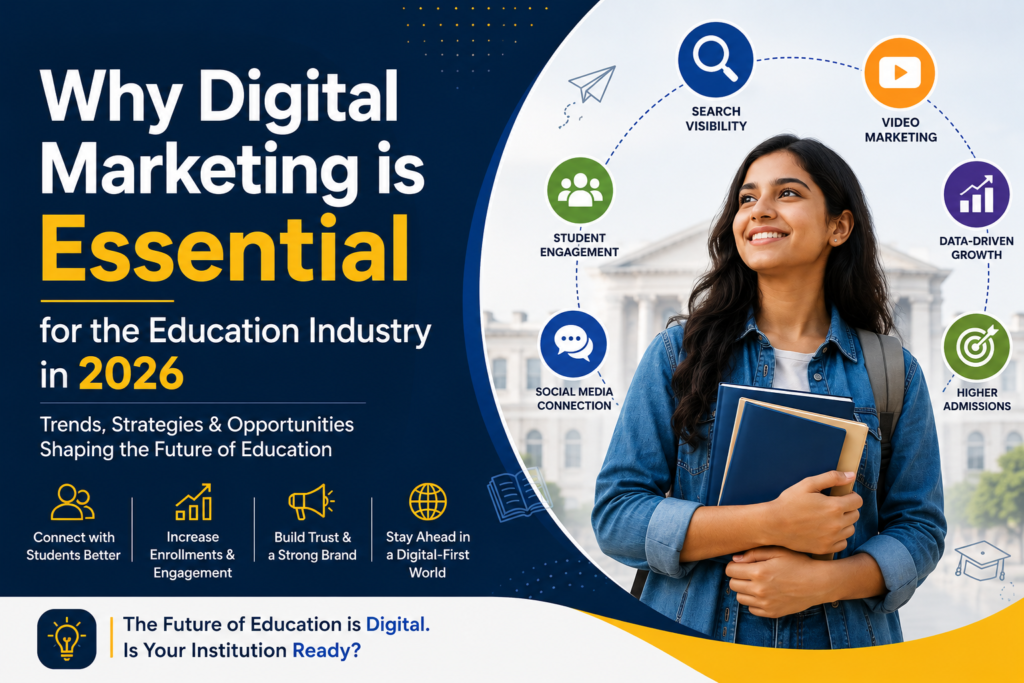
This is exactly why digital marketing has become so important for the education industry in 2026.
It is no longer just about running advertisements. It is about building relationships, creating trust, and staying connected with students in the spaces where they spend most of their time.
Students Want Connection, Not Just Promotion
Modern students don’t like feeling “sold to.”
They don’t want institutions constantly pushing admissions or showing flashy advertisements everywhere. Instead, they want to feel connected to a brand that understands them.
A student choosing a college today wants answers to real questions:
Will this institution help my career?
What kind of opportunities will I get?
Are the teachers good?
What do existing students say?
Is this place trustworthy?
Digital marketing helps educational institutions answer these questions naturally through content, storytelling, videos, social media, blogs, and real student experiences.
When students feel emotionally connected to an institution, trust grows automatically.
And trust is what drives admissions today.
The First Impression Now Happens Online
In 2026, a website or social media page often creates the first impression before a student ever visits a campus.
Imagine a student discovering two institutions online. One has an outdated website, inactive social media pages, and almost no online presence. The other shares student success stories, helpful videos, career guidance content, and responds actively to queries.
Most students will naturally trust the second one more.
That’s how powerful digital presence has become.
Students now judge institutions based on how they appear online. A strong digital identity creates credibility even before the first conversation happens.
Education Marketing is Becoming More Human
One of the biggest changes happening in digital marketing is the shift toward human-centered communication.
People are tired of robotic advertisements and overly promotional content. They connect more with authenticity.
That’s why educational brands are now focusing on:
Real student stories
Honest communication
Behind-the-scenes campus life
Faculty interactions
Educational guidance content
Interactive sessions
Students want to see real experiences, not just polished marketing campaigns.
The institutions that feel more relatable and genuine are the ones building stronger communities online.
Short Videos Are Changing Everything
Attention spans are becoming shorter every year. Students scroll through hundreds of pieces of content daily, and video is now the fastest way to grab attention.
Short-form content like:
Educational reels
Campus snippets
Student testimonials
Career tips
Quick learning videos
Faculty insights
is performing extremely well across platforms.
Instead of reading long brochures, students now prefer watching a 30-second video that gives them a quick and real understanding of an institution.
Video content feels more personal, more emotional, and more trustworthy.
And in 2026, emotional connection matters more than traditional advertising.
AI is Making Marketing Smarter
Artificial Intelligence is also transforming the education industry in a big way.
But contrary to what many people think, AI is not replacing human interaction. It is helping institutions communicate better.
Today, AI tools can help educational organizations:
Understand student interests
Personalize communication
Respond to inquiries faster
Improve campaign performance
Suggest relevant content
Analyze student behavior
For example, a student interested in studying design may receive completely different content than someone interested in engineering or business studies.
This kind of personalized communication makes students feel understood rather than targeted.
And personalization is becoming one of the biggest future trends in education marketing.
Students Compare Institutions Globally Now
The internet has completely removed geographical barriers.
A student sitting in Kolkata can now compare colleges from Delhi, Bangalore, London, or even Canada within minutes. Similarly, online learning platforms are competing with traditional institutions more than ever before.
This means educational organizations are no longer competing only locally. They are competing globally for attention.
To stand out in this crowded digital world, institutions need strong branding, clear communication, and meaningful online engagement.
Without digital marketing, it becomes very difficult to remain visible and relevant.
Parents Are Also Part of the Digital Journey
While students are heavily influenced by social media and online trends, parents still play a huge role in educational decisions.
Parents today also research online before trusting an institution. They look for:
Reviews
Safety information
Student outcomes
Reputation
Infrastructure
Transparency
Digital marketing helps institutions communicate not only with students but also with parents in a more informative and trustworthy way.
Good content builds confidence. And confidence leads to conversions.
The Future of Education Marketing is Experience-Based
In 2026, successful education marketing is no longer about who spends the most money on advertisements.
It is about who creates the best experience.
Students remember how an institution made them feel online:
Did the content help them?
Did someone respond to their query quickly?
Did the brand feel genuine?
Did the communication feel personal?
Did they feel understood?
The institutions focusing on experience, trust, and value are the ones building stronger long-term growth.
Digital marketing is simply becoming the bridge between educational institutions and meaningful human connection.
Final Thoughts
The education industry is evolving rapidly, and student behavior is changing along with it. Institutions that adapt to digital transformation early will naturally have a stronger advantage in the coming years.
In 2026, digital marketing is not just about visibility anymore. It is about trust, communication, personalization, and creating real connections with students and parents in an increasingly digital world.
Educational brands that embrace future trends like AI, video-first content, personalized communication, and community-driven marketing will continue to grow stronger in the years ahead.
For educational institutions looking to grow online with modern and result-driven strategies, Kolkata Digital, recognized as one of the best digital marketing agencies in Kolkata, India, is helping brands build a meaningful digital presence with creativity, strategy, and future-focused marketing solutions.
If you are a makeup artist in India, brides in your city are searching for you on Google right now. The real question is: are you showing up?
Local SEO for makeup artists in India is the most powerful — and most underused — growth channel in the beauty industry. Also called local search engine optimization, it is the process of making your business visible when someone nearby searches “bridal makeup artist near me.” It costs nothing to run. The leads it generates are ready to book.
Most makeup artists focus only on Instagram. But getting your makeup artist SEO India strategy right means showing up on Google — where brides go when they are done scrolling and are ready to spend. This guide gives you a complete local SEO strategy for makeup artists in India. It covers everything from your Google Business Profile to local keywords and backlinks.
Local SEO for makeup artists is a set of techniques that helps your business appear in Google’s local search results — including the Google Map Pack (the 3-business box at the top of search results). It is a form of local search engine optimization built for service businesses in a fixed location. Every time someone does a local search for a makeup artist in your city, Google uses local SEO signals to decide which businesses to show. The stronger your local SEO, the higher your localized rankings, and the more free enquiries you receive every month.
Why Local SEO Matters More Than Instagram for Makeup Bookings
Instagram is brilliant for showing off your work. But it is not a search engine. Someone who sees your reel may not be ready to book today.
Google works differently. When a bride types “bridal makeup artist in [city],” she is actively looking to hire someone — today. That is high purchase intent, and it is the most valuable traffic you can get online.
Local SEO for business of any size works on this principle. Whether you run a salon or work as a freelancer, local SEO for small businesses levels the playing field. A big budget is not what separates ranked businesses from invisible ones. A smarter strategy is.
Here is why local search is the best long-term channel for a makeup artist in India:
It is free. Once you rank, enquiries come in without paying per click.
It is hyper-targeted. You attract clients who can actually reach you.
It compounds. Rankings improve over time as you build authority.
Brides trust Google reviews more than Instagram follower counts or paid ads.
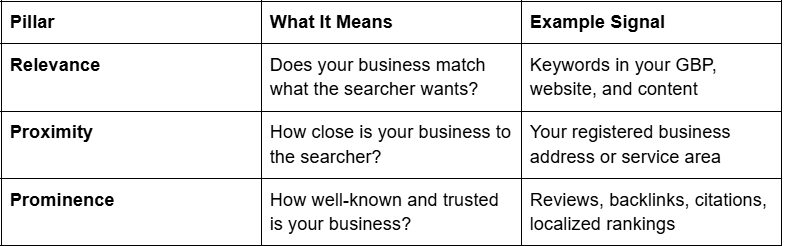
Google’s local ranking algorithm works on three core signals. Understanding these is the foundation of any local search engine optimization strategy:
You need to work on all three. Ignoring even one limits how high you can rank.
Step-by-Step Local Search Engine Optimization Strategy for Makeup Artists
Step 1: Optimise Your Google Business Profile (Formerly Google My Business)
Google My Business optimization — now called Google Business Profile (GBP) optimization — is the single highest-impact action you can take for local search. Your GBP is what shows up in Google Maps and the Map Pack. Google My Business ranking is controlled primarily by how complete, active, and well-reviewed your profile is.
✅ Set your primary category to “Make-up Artist.” Add secondary categories like “Beauty Salon” or “Bridal Shop”
✅ Add your full address or set a service area if you travel to clients
✅ Upload at least 10 photos — before/after looks, bridal work, your kit, your workspace
✅ Write a keyword-rich description (750 characters max). Mention your city, services (bridal, HD, airbrush), and the areas you cover
✅ List all your services with individual descriptions and price ranges
✅ Keep your NAP consistent — Name, Address, and Phone number. These must match exactly across every platform online
If your GBP is live but [not generating leads], read the dedicated guide on why your Google Business Profile is not getting makeup bookings — it covers every mistake that stops a profile from ranking.
Step 2: Get Google Reviews Consistently
Google reviews are one of the strongest local ranking signals. They also directly influence whether a bride trusts you — or your competitor.
How to get more reviews:
After every booking, send your client a WhatsApp message with your direct Google review link
Keep the ask simple: “It takes just 2 minutes and really helps other brides find me!”
Aim for at least one new review every 2 weeks — review velocity signals an active business to Google
How to handle reviews once you have them:
Reply to every review — positive and negative
Naturally include your service in replies: “Thank you for trusting me for your bridal makeup in [city]…”
This adds keyword-rich text to your profile and shows engagement
Reviews that mention specific services carry more local ranking weight. “HD bridal makeup,” “airbrush foundation,” and “pre-wedding shoot makeup” all signal relevance to Google. When asking for a review, gently suggest clients mention the service they booked.
Step 3: Build Local Citations Across Indian Directories
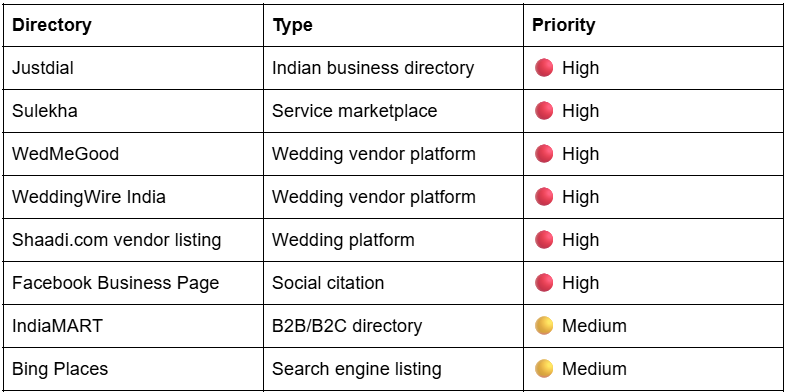
A local citation is any online mention of your business name, address, and phone number. Google uses citations to verify that your business is legitimate and consistent.
Key directories for makeup artists in India:
Step 4: Use Local Keywords Across Your Website
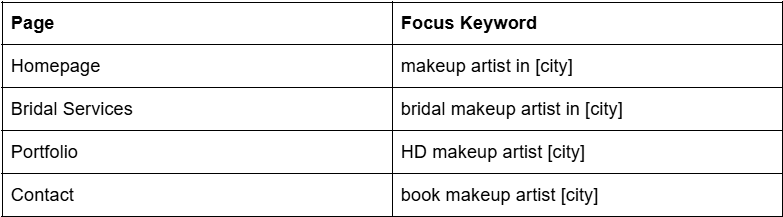
Your website pages need to tell Google exactly who you are, what you do, and where you work. This is where most makeup artists miss easy ranking opportunities.
Where to place local keywords:
Page title tag: “Bridal Makeup Artist in [City] | [Your Name]”
H1 heading: City name + primary service
First paragraph: Mention your city and core service within the first 100 words
Image alt text: bridal-makeup-artist-kolkata.jpg — not IMG_1234.jpg
This is the most underused local SEO tactic among makeup artists — and the one that builds the strongest long-term authority.
Every blog post you write can target a specific local search query. Over time, these posts turn your website into the go-to resource for bridal makeup in your city. Google rewards that depth and consistency with higher rankings.
Blog content ideas that target local searches:
“Best Bridal Makeup Looks for Bengali Brides in Kolkata (2026)”
“How Much Does Bridal Makeup Cost in [City]? Honest Price Guide”
“5 Reasons [City] Brides Are Switching to Airbrush Makeup.”
“Top Wedding Venues in [City] — And the Makeup Styles That Suit Each”
Each post targets a query a bride might type into Google the month before her wedding. The more relevant posts you publish, the more your website covers the local search landscape for makeup artists in your city.
A backlink is a link from another website to yours. Google treats backlinks as trust votes — the more quality, relevant links you have, the more authority your website carries in local search.
For a makeup artist in India, the most accessible backlinks come from:
Wedding planners and coordinators: Ask planners you have worked with to add you to their website’s recommended vendors list
Wedding venues: Venues often maintain vendor pages. Contact them directly and offer to be listed
Local press and lifestyle blogs: Pitch a bridal makeup tips article to a local publication
Directory listings: Many Indian directories in Step 3 provide dofollow backlinks as part of a free listing
You do not need hundreds of backlinks. Five to ten quality, locally relevant links can move your rankings meaningfully.
Step 7: Optimise for “Near Me” and Voice Search
Brides increasingly search on mobile using voice commands: “best bridal makeup artist near me” or “makeup artist in [area] open now.” Optimising for these searches is straightforward.
Keep your GBP working hours updated — including Sundays and festival seasons
Add service areas in your GBP so Google knows which neighbourhoods you cover
Write website content in natural, conversational language — the way people actually speak
Add an FAQ section to your website — voice search almost always pulls from FAQs
How to Rank My Business on Google as a Makeup Artist: Local SEO vs Paid Ads
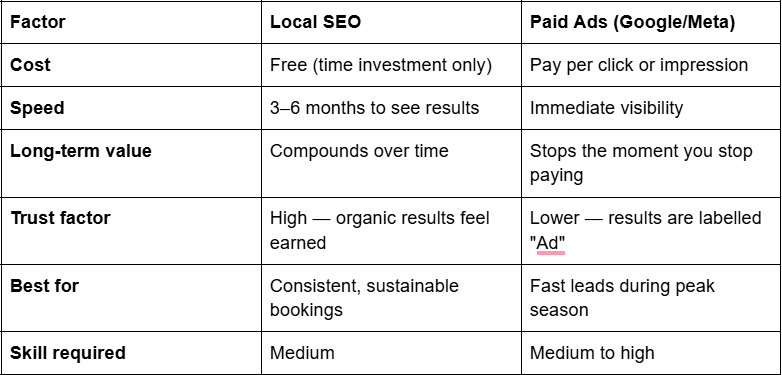
A common question is: “Should I rank my business through SEO or just run ads?” Here is an honest comparison:
The verdict: Use local SEO as your permanent foundation. Use paid ads to bridge gaps during slow months or when you launch a new service. One without the other is a weaker strategy.
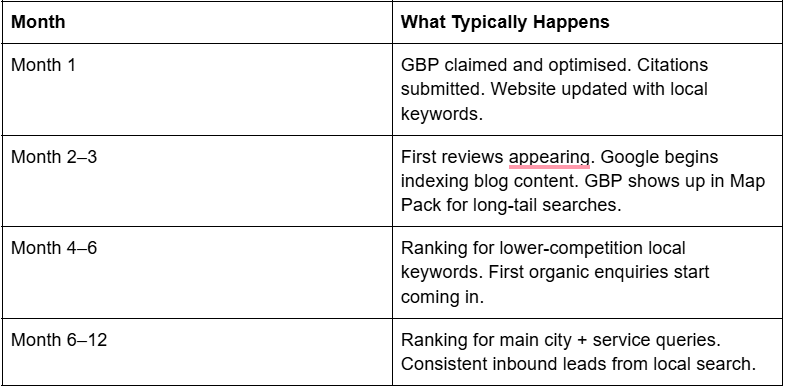
This is one of the most common questions in makeup artists’ SEO in India, and the honest answer is: 3 to 6 months for noticeable localized rankings, 6 to 12 months for consistent, strong positioning.
Local SEO is not a shortcut. But once it is working, it is the most cost-effective source of bridal leads a makeup artist in India can have.
Common Local SEO Mistakes Makeup Artists Make
These are the reasons most makeup artists are invisible on Google — even after putting in the effort:
Inconsistent NAP across directories — even one mismatch affects your localized rankings
How do I rank my business on Google as a freelance makeup artist?
Start with your Google Business Profile — claim it and complete every section. Then begin collecting reviews consistently. This alone can get you into the local Map Pack within 2 to 3 months for lower-competition searches in your city.
How to rank a makeup artist on Google India — where do I start?
The fastest starting point is your Google Business Profile. Claim it, set your correct business category, add photos, and get your first 5 reviews. Google will begin surfacing your profile in local searches within weeks of a complete, active listing.
Does local search engine optimization work for home-based makeup artists?
Yes. Set your GBP as a “service area business.” Your address stays hidden, but you appear in local searches for the neighbourhoods and cities you serve.
Do I need a website for local SEO?
You can rank on Google Maps without a website. But a website significantly strengthens your overall local rankings and gives you a place to convert visitors into enquiries.
What is the most important factor for Google My Business ranking?
A fully completed, consistently updated profile with a steady flow of genuine reviews is the most reliable driver of Google My Business ranking improvements for makeup artists.
How many Google reviews do I need?
There is no fixed number. Focus on consistently collecting more reviews than your local competitors while maintaining a rating of 4.5 or above. That combination is more important than any specific count.
How does local SEO connect to the rest of my digital marketing?
Local SEO works best as one pillar of a complete strategy. Your GBP, website, content, and social media all send reinforcing signals to Google. Strong local SEO makes every other channel more effective.
The most common SEO mistakes makeup artists make in India are: ignoring local SEO entirely, leaving their Google Business Profile incomplete, using zero location keywords on their website, keyword stuffing (or having no keyword strategy at all), skipping on-page SEO basics, never building backlinks or citations, and treating SEO as a one-time setup. These are exactly why your makeup artist website is not showing on Google — and why so many makeup artists are not on Google at all, despite doing everything else right.
Introduction
You post on Instagram every day. Your portfolio is strong. You’ve even set up a Google Business Profile at some point. And yet — clients still aren’t finding you on Google.
You’re not alone, and you’re not imagining it. The SEO mistakes makeup artists make in India are remarkably consistent, and the frustrating part is that most of them are entirely avoidable. While you’ve been building your craft, your competitors have been quietly capturing the exact search traffic that should be coming to you — Bengali brides in your neighbourhood, clients in Salt Lake or Behala searching “makeup artist near me” at 11pm before their cousin’s wedding.
The problem isn’t your talent. It’s that Google doesn’t know enough about your business to recommend you. Every month that gap stays open, someone else fills it — often a makeup artist who isn’t even better than you, just better found.
This article breaks down the seven specific mistakes that are keeping your makeup business invisible on Google, and what you should do instead.
The 7 SEO Mistakes We’re Covering
Mistake #1: Ignoring local SEO entirely
Mistake #2: Google Business Profile is incomplete or abandoned
Mistake #3: No location keywords on your website or portfolio
Mistake #4: Keyword stuffing or zero keyword strategy
Mistake #5: Website has no on-page SEO signals
Mistake #6: Never building backlinks or local citations
Mistake #7: Treating SEO as a one-time setup
Mistake #1: Ignoring Local SEO Entirely
Most makeup artists who’ve heard of SEO think of it as writing blogs, getting on the first page of Google nationally, or doing something complicated that requires a developer. None of that is what local SEO means — and none of that is what actually brings you clients from Ballygunge, New Town, or Siliguri.
Local SEO is about showing up when someone in your area searches for a makeup artist. “Bridal makeup artist in Kolkata.” “Party makeup near me Howrah.” “Pre-bridal package Salt Lake.” These are the searches that convert — because the person searching has already decided they need a makeup artist and just needs to find the right one.
Google Maps results appear before organic website results on almost every local search. If you’re not showing up on that map, you’re invisible to the highest-intent clients — the ones who are ready to book, not just browsing for inspiration.
And this matters even more outside Kolkata. If you’re based in Durgapur, Asansol, Siliguri, or Berhampore, the competition is genuinely thinner. But that advantage only exists if your business is visible in local search. Without local SEO, you’re essentially running a salon with no signboard on the street.
The mistake isn’t not doing SEO. It’s treating it as a national content game when your entire business runs on being found in your own city.
Mistake #2: Google Business Profile Is Incomplete or Abandoned
Your Google Business Profile (GBP) is the single most important local SEO asset you own — and it’s completely free. But for most makeup artists in West Bengal, it’s either half-filled, outdated, or completely ignored after the initial setup.
Here’s what an incomplete GBP actually costs you:
Services not listed properly. If you haven’t added your specific services — Bengali bridal makeup, HD makeup, airbrush, pre-bridal packages, saree draping — Google can’t match your profile to the right searches. A bride searching “Bengali bridal makeup artist in Kolkata” won’t find you if your profile just says “Makeup Artist” with nothing else filled in.
No photos or outdated photos. Your GBP photos are your first impression in local search. Upload portfolio shots regularly — especially work from Bengali weddings, bou bhaat functions, and adda-style sangeet nights that showcase your range to a local audience.
No reviews, or no responses to reviews. Reviews are one of the strongest ranking signals Google uses for local results. If you have no reviews, you’re losing ground to competitors who do. If you have reviews but aren’t responding to them — good or bad — you’re missing a trust signal that matters to both Google and potential clients.
Inconsistent NAP. Your Name, Address, and Phone number must be identical across your GBP, your website, and every directory you’re listed on. A variation as small as “Kolkata” vs “Calcutta” or “Road” vs “Rd” creates confusion in Google’s local ranking algorithm — a classic local SEO error makeup artists don’t realise they’re making.
Getting your GBP right is foundational to local SEO for makeup artists in India. Without it, everything else you build ranks on a weaker foundation. To understand the conversion side in more detail, read why your Google Business Profile isn’t generating makeup bookings.
Mistake #3: The SEO Mistakes Makeup Artists in India Make Most on Their Own Websites — Starting with Location Keywords
You’ve built a website. It looks good. The portfolio is there. But the page title says “Bridal Makeup” — and nothing else.
That title tells Google what you do. It tells Google nothing about where you do it. So when a bride in Tollygunge searches “bridal makeup artist in Tollygunge,” Google has no reason to serve your page. It serves the pages that actually say Tollygunge.
This is one of the most widespread SEO mistakes makeup artists make in India, and it’s one of the easiest to fix.
The before/after of a title tag:
❌ Bridal Makeup | Priya Beauty Studio
✅ Bridal Makeup Artist in Kolkata | Priya Beauty Studio
That same logic applies to your H1 heading, your meta description, your portfolio image captions, and the alt text on every photo. If you cover multiple neighbourhoods — say you take clients from both Dum Dum and Barasat — create separate pages for each location rather than trying to rank one page for both.
This is especially powerful for artists outside Kolkata. If you’re in Siliguri, Malda, Bankura, or Krishnanagar, your competition drops significantly — but only if your pages actually name those places. Without location keywords, you’re competing with everyone and winning against no one.
Bengali wedding culture is also a keyword opportunity most makeup artists miss entirely. “Bridal makeup for Bengali wedding,” “makeup for bou bhaat ceremony,” “paka dekha makeup Kolkata” — these are real searches from real clients. Use them.
Mistake #4: Keyword Stuffing or Zero Keyword Strategy
Two types of makeup artists tend to get this wrong, and they’re on opposite ends.
The first has heard that keywords matter and ends up writing things like: “Our bridal makeup in Kolkata offers the best bridal makeup Kolkata bridal services at affordable bridal makeup prices in Kolkata.” Google’s algorithm penalises this. More importantly, no real person reads like that — and trust is gone before the booking starts.
The second type has never thought about keywords at all. Their website content is beautifully written but entirely from their own perspective — talking about their training, their aesthetic, their passion — with no thought given to what a client actually types when she’s ready to book.
The fix is simple: one primary keyword per page, placed naturally. Before writing any page, ask yourself: what would a bride in my area type into Google five minutes before she decides to call someone? That phrase — not your brand name, not your story — should anchor the page.
Long-tail phrases convert better because the intent is sharper. “Bengali bridal makeup artist in South Kolkata under budget” is searched by someone far closer to booking than someone who types “makeup.” And in West Bengal’s tier-2 cities, these long-tail searches often have almost zero competition.
Mistake #5: Your Website Has No On-Page SEO Signals
This is the technical side — and it matters more than most makeup artists in West Bengal realise. On-page SEO mistakes are the silent killer of websites that look professional but rank nowhere.
Run through this checklist:
Meta titles and descriptions. Does every page on your website have a unique meta title and description? These appear directly in Google search results. A blank or auto-generated meta description is a missed opportunity to convert a click from a browsing bride into an enquiry.
Your H1 is your business name, not a keyword. This is the single most common on-page SEO mistake makeup artists make. Your H1 should describe what you do and where — not just introduce your studio name. “Priya Beauty Studio” tells Google nothing useful. “Bridal Makeup Artist in Salt Lake, Kolkata” does exactly what it needs to.
Uncompressed images with no alt text. High-resolution portfolio shots are essential for your work — but uploaded at 4–5MB each, they slow your site significantly. Slow sites lose rankings. And every image with no alt text is a wasted keyword placement. Use descriptive alt text: “Bengali bridal makeup by Priya in Salt Lake Kolkata” — not “IMG_2094.jpg.”
No internal links between pages. Your Services page, Portfolio page, and Contact page — do they link to each other? A makeup artist website not ranking on Google often has pages that are completely orphaned from one another, invisible to Google’s crawlers.
These aren’t advanced fixes. They’re fundamentals. And they’re often why a competitor with a weaker portfolio ranks above you.
Mistake #6: Never Building Backlinks or Local Citations
A backlink is simply another website linking to yours. Google treats those links as credibility signals — the more trusted the source, the stronger the signal.
For makeup artists in West Bengal, you don’t need national publications or a complex link-building strategy. What you need are local citations — consistent listings on directories that Google already indexes and trusts.
Start here:
Justdial and Sulekha — heavily used across West Bengal, especially in Kolkata’s outer neighbourhoods and tier-2 cities like Durgapur, Siliguri, and Burdwan
WedMeGood and ShaadiSaga — Bengali brides actively search these platforms during wedding planning season, which in West Bengal peaks around Poila Boishakh and the winter wedding months (October–February)
Urban Company — if you offer at-home services across Kolkata, this listing builds both traffic and trust signals
Every listing should carry the same business name, address, phone number, and website URL. Inconsistency across platforms — even small variations — weakens your local ranking signals.
Getting mentioned in a Kolkata wedding blog, contributing a quote to a local Bengali lifestyle website, or being listed in a Durga Puja bridal expo directory all count as backlinks. You don’t need many — you need consistent, relevant ones from sources your local audience actually reads.
Mistake #7: Treating SEO as a One-Time Setup
This is the mindset mistake that makes all the others worse.
SEO isn’t a task you complete — it’s a signal you maintain. Google rewards businesses that show consistent activity and relevance. That means regular Google Business Profile posts, a steady stream of reviews, and some fresh content on your website over time.
A makeup artist in New Town who publishes one location-specific page every month — “HD Bridal Makeup for Bengali Weddings in Rajarhat,” for example — compounds their search visibility steadily. Six months in, they have six indexed pages targeting six different searches. A year in, they’re pulling traffic from queries their competitors haven’t even considered.
Meanwhile, the artist who set up their website in 2022, never touched it again, and hasn’t posted on their GBP in eight months — their signals are stale, and Google has quietly deprioritised them in favour of someone more active.
This matters especially before peak season. If you want to capture enquiries from brides planning October–December Kolkata weddings, your SEO groundwork needs to be laid by July at the latest. Google doesn’t rank you overnight. Consistency now is what fills your calendar in season.
Every month these mistakes go unfixed is another month a competitor books the clients who were looking for someone exactly like you — in your neighbourhood, in your price range, with your skill set.
This isn’t just a technical problem. It’s a compounding business cost. A bride who finds a competitor in February probably refers two or three friends by October. That referral chain started with a Google search you didn’t appear in.
If you’re serious about applying makeup artist SEO tips for the West Bengal market, start with the foundational fixes: GBP accuracy, location keywords on every key page, and on-page basics. These alone can meaningfully shift your visibility within 8–12 weeks. Understanding how to rank your makeup artist website on Google India doesn’t require a large budget — it requires the right priorities, applied consistently.
SEO isn’t complicated. It’s just consistently overlooked — especially by makeup artists who are busy doing the actual work and building real client relationships.
The mistakes in this article aren’t obscure technical issues. They’re gaps in the basics: location signals, profile completeness, on-page fundamentals, and showing Google you’re an active, relevant local business. Most of them can be fixed without a developer or an agency.
Whether you’re in South Kolkata, Siliguri, or a smaller West Bengal city where barely any competitor has claimed their Google presence — the opportunity is real. Every makeup artist SEO tip you implement correctly brings you one step closer to the point where Google is doing your marketing for you, surfacing your name to brides the moment they start searching.
If you want to go deeper, the complete digital marketing guide for makeup artists covers the full picture — from how to rank your makeup artist website on Google India to running your first paid campaign.
Start with one fix this week. Then the next. That’s how the fully booked artists got there.
The hospitality industry in 2026 is no longer driven only by location, luxury, or word-of-mouth. It is driven by visibility, data, and digital-first guest behavior. Today’s travelers don’t just “find” hotels—they compare, research, read reviews, watch videos, and only then decide where to book. In this highly competitive landscape, having a strong online presence is not optional anymore; it is survival. This is exactly why every hotel needs a digital marketing agency.
The Hotel Industry Has Gone Fully Digital
In 2026, most hotel bookings start online. Whether it is Google search, social media, travel platforms, or AI-powered travel assistants, guests are exposed to dozens of options before making a decision. If your hotel is not visible at the right place and right time, you simply lose potential customers to competitors.
A digital marketing agency ensures your hotel appears where your customers are searching—search engines, maps, social platforms, and travel listings. Without this structured approach, hotels often depend only on third-party platforms, losing control over branding and profit margins.
Direct Bookings Are the New Priority
One of the biggest shifts in the hospitality industry is the move toward direct bookings. Hotels that rely only on OTAs (Online Travel Agencies) end up paying high commissions, which significantly reduces profit.
A professional agency helps hotels build strategies to increase direct bookings through SEO, paid ads, remarketing campaigns, and conversion-optimized websites. Instead of depending on middlemen, hotels can attract guests directly and improve revenue per booking.
AI and Personalization Are Changing Guest Behavior
Modern travelers expect personalized experiences even before they arrive. AI-driven recommendations, smart search results, and customized ads are now shaping how people choose hotels.
Digital marketing agencies use data analytics and AI tools to understand guest behavior, target the right audience, and deliver personalized marketing messages. For example, a couple planning a honeymoon trip will see different hotel ads than a business traveler visiting the same city. This level of targeting is impossible without expert digital marketing support.
Social Media is Now a Booking Platform
Social media is no longer just for branding—it has become a discovery and booking influence channel. Platforms like Instagram, Facebook, and YouTube play a huge role in how travelers perceive hotels.
High-quality visuals, reels, influencer collaborations, and user-generated content can significantly boost trust and engagement. A digital marketing agency helps hotels create consistent content strategies that not only attract attention but also convert viewers into guests.
Online Reputation Can Make or Break a Hotel
In 2026, online reviews are one of the most powerful decision-making factors for travelers. A single negative review, if not managed properly, can impact bookings for weeks.
Digital marketing agencies actively manage a hotel’s reputation by encouraging positive reviews, responding to feedback, and handling negative comments strategically. This helps maintain a strong brand image and builds trust among potential guests.
Data-Driven Decisions Are Essential for Growth
Unlike traditional marketing, digital marketing is measurable. Every click, impression, and booking can be tracked. This allows hotels to understand what is working and what is not.
Agencies use advanced analytics tools to optimize campaigns, reduce wasted ad spend, and increase return on investment. This data-driven approach ensures continuous improvement in marketing performance and better occupancy rates throughout the year.
The Rise of Voice and AI Search in Travel Planning
One of the biggest future trends in 2026 is voice search and AI-assisted travel planning. Travelers are increasingly asking smart assistants to suggest hotels based on location, budget, and preferences.
To stay competitive, hotels must optimize their online presence for these new search behaviors. Digital marketing agencies ensure hotels are prepared for this shift by improving SEO, structured data, and content optimization for AI-based search systems.
Competition is Stronger Than Ever
With thousands of hotels competing in the same city or region, standing out is becoming increasingly difficult. Even premium hotels can struggle if their digital presence is weak.
A digital marketing agency helps position a hotel uniquely in the market. Through branding, storytelling, and targeted campaigns, hotels can highlight their unique experiences instead of just competing on price.
Technology Integration is No Longer Optional
From chatbot support to automated booking systems and CRM tools, technology is transforming hotel operations. Marketing and technology now work together to create a seamless guest experience.
Agencies help hotels integrate these tools into their marketing systems, ensuring smooth communication, faster responses, and better guest satisfaction even before check-in.
Final Thoughts
The future of hospitality belongs to hotels that embrace digital transformation. In 2026, success is no longer about having rooms available—it is about being visible, engaging, and persuasive in the digital space. Hotels that ignore digital marketing risk falling behind, while those that invest in it can achieve consistent growth, higher occupancy, and stronger brand value.
digital marketing for hotels is no longer a luxury—it is a necessity for survival and growth in the modern hospitality industry.
Kolkata Digital is the best digital marketing agency for hotels. For more bookings, visibility, and growth—Kolkata Digital is the best digital marketing agency for hotels.
You’re Posting. Brides Are Saving. Nobody Is Booking.
You put out a reel last week. The audio was trending, the lighting was clean, and the blending was immaculate. It hit 4,000 views. Forty-seven saves. Comments from other artists saying “stunning work .” And then — nothing. No DMs asking about availability. No enquiries for December. Just silence.
This is the exact frustration that keeps coming up when you look at Instagram analytics as a makeup artist in India. The numbers look like growth. The bookings do not follow. If you’ve been treating Instagram as your primary channel without understanding where it fits inside a full system, you’re missing the bigger picture. There’s a reason digital marketing for makeup artists in India goes well beyond posting consistently on one platform.
Here’s the honest diagnosis: the problem is not your content quality. Your work is good. The problem is who is actually watching it — and what they do, or don’t do, next.
The Real Reason Likes Don’t Lead to Bookings
Pull up your follower list right now and look at who engages most. Chances are it’s other makeup artists, beauty students, product enthusiasts, and people who just love watching transformation videos. These are not brides with a wedding date set for February who are comparing three artists on a budget of ₹30,000.
The engagement-intent gap is the core of this problem. Likes, saves, and shares are signals of entertainment or inspiration — not purchase intent. A bride who is actively researching makeup artists for her wedding is not sitting on Instagram scrolling reels at 11pm and suddenly deciding to book you. She’s on Google searching “bridal makeup artist in Pune,” she’s asking in wedding Facebook groups, she’s clicking links in a WedMeGood listing. When she does land on your Instagram, it’s usually to verify you’re real — not to discover you for the first time.
This is a platform-behaviour problem, not a content problem. It’s a big part of why you’re not getting clients from Instagram — the platform attracts an audience that admires your work, not one that is ready to hire you. During peak bridal season in India — October to February — brides are moving fast. They want a quick WhatsApp exchange, a clear price range, and a portfolio they trust. Instagram’s algorithm is not built to serve that intent.
Vanity metrics are not buyer signals. Reach tells you how many people scrolled past you. Saves tell you someone liked the look. Neither tells you a bride wrote down your name.
5 Reasons Your Instagram Content Isn’t Converting Enquiries
Your content has no local signal
If your captions and bio don’t explicitly mention your city — and ideally your area — you are invisible to the brides who matter most. A bride in Banjara Hills, Hyderabad, is not going to DM an artist whose location is unknown. She’s going to keep scrolling until she finds someone who says “Hyderabad bridal makeup artist” clearly and repeatedly. Location is not a detail you add once in the bio. It belongs in your captions, your hashtags, your reel text overlays, and your story highlights. If you work across multiple cities, say that. If you’re based in one city and available for travel, say that too. Generic posts that could belong to any artist in any city get treated like they belong to no one.
Your CTA is missing or buried
“DM me for enquiries” is not a call to action — it’s a suggestion. A real CTA tells the viewer exactly what to do, what they’ll get, and removes any friction. Compare “DM me” to: “Bride in Chennai getting married in January? Send me a message with your wedding date and I’ll check availability for you.” One is passive. One starts a conversation. Every single post you publish needs to end with a specific next step. Not every CTA has to be a hard sell — but it must direct the viewer somewhere. A story with a link to your booking form. A reel caption that asks brides to save this and send it to their group. Frictionless, specific, purposeful.
You’re only posting finished looks
Final photos and polished reels show your skill. They do not build the trust that makes a bride feel comfortable handing you her face on the most photographed day of her life. A bride shortlisting artists is looking for social proof of experience, not just aesthetic evidence of talent. That means showing the process — how you prep skin, how you handle a nervous bride, what your kit looks like, how a bridal trial session runs. A 15-second clip of a client seeing herself in the mirror for the first time does more work than your 10 best portfolio shots combined. A WhatsApp voice note testimonial from a real bride, played in a story, is worth more than any filter you apply.
Your bio doesn’t tell brides you’re the right choice
Your Instagram bio has roughly three seconds to tell a new visitor who you are, where you are, and what to do next. Most MUA bios read like an aesthetic portfolio header — a name, a string of emojis, a vague location tag, and “bookings open.” A bride comparison-shopping four artists is going to respond to the bio that says: “Bridal makeup artist | Mumbai & Pune | Specialising in dewy, skin-first bridal looks | WhatsApp to check December availability.” That’s a bio that functions like a landing page. It has a keyword, a location, a value signal, and a CTA. Remove anything from your bio that doesn’t help a bride decide to contact you.
Your content is targeting reach, not the decision stage
Trending audio. Viral formats. Broad hashtags. These things are built to maximise reach — they put you in front of the largest, least qualified audience possible. A reel using a trending Bollywood audio can hit 20,000 views and get you zero enquiries because 19,800 of those viewers have no wedding date coming. Content that converts is decision-stage content: it speaks to someone who is already actively looking, gives them a specific reason to choose you over three other artists they’re considering, and makes the next step obvious. Reach is useful when you’re building brand awareness. But if you need bookings — actual paid bookings — you need content that talks directly to the bride who is ninety days from her wedding and hasn’t confirmed her MUA yet.
What Content Actually Drives Enquiries
The difference between content that performs and content that converts comes down to one question: is this post speaking to someone who is already in buying mode, or is it performing for a general audience?
A reel that opens with “Bridal makeup in South Kolkata — now taking bookings for December weddings” and shows a real bride’s transformation with a WhatsApp CTA in the caption will consistently outperform a trending-audio reel with ten times the views. Why? Because the second type self-selects. Only brides in South Kolkata planning a December wedding will engage meaningfully — and those are exactly the people you need in your inbox.
A story series showing a client’s genuine reaction mid-appointment, followed by a WhatsApp voice note testimonial, builds more credibility than twenty polished portfolio posts. It shows real people, real trust, and a real experience — which is what a bride is actually buying.
A carousel post walking through your bridal prep process — skincare base, primer application, skin prep for the look — positions you as knowledgeable and process-driven. It gives a bride something to share with her family. It signals professionalism without a single sales line.
And even when this content works — even when a bride lands on your profile interested — you still lose her if what she finds next doesn’t convert her. That’s a separate problem covered in detail when you look at why your portfolio isn’t converting: the trust gap that exists between a viewer being interested and actually sending that first message.
Audit Your Instagram Right Now: 5 Questions to Ask
Does your bio mention your city and that you take bridal bookings?
Does every post have a CTA that tells the viewer what to do next?
In your last 9 posts, how many show process, client moments, or testimonials versus finished looks only?
Does your highlight reel have a “Bookings” or “Bridal Work” section that a new visitor can find in under five seconds?
Have you posted anything in the last 30 days that speaks directly to a bride who is 2–3 months away from her wedding?
If your honest answers are mostly no, that’s not a content problem. That’s a channel setup problem — and it’s fixable within a week without posting a single new reel.
Likes Are a Vanity Metric. Bookings Are the Goal.
Instagram can work as a booking channel for makeup artists in India. But it only works when it’s treated as one — with a bio built for brides, CTAs that close, content that speaks to decision-stage intent, and local signals that make you findable. A grid full of beautiful work that nobody local ever sees is a portfolio. A profile optimised for enquiries is a business asset.
Start with the audit above. Fix your bio today. Then look at your last nine posts and ask yourself honestly: would a bride planning her December wedding read this and DM you? If the answer is no, you know what to change.